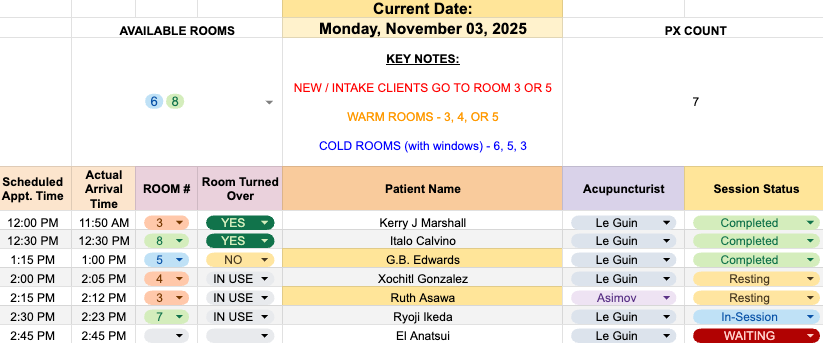
A live, color-coded room tracker used daily by front-desk staff.
Overview
I built the Room Tracker System to eliminate a tedious, error-prone daily task at a busy wellness clinic.
Using Google Sheets and a custom Apps Script I developed with ChatGPT and Claude, I turned a repetitive 20-minute process into a two-minute, system that organizes and archives daily patient data automatically.
Role: Systems Designer & Workflow Architect
Tools: Google Sheets, Google Apps Script, ChatGPT
Result: 90% faster morning prep, zero typos, consistent record keeping
Tools: Google Sheets, Google Apps Script, ChatGPT
Result: 90% faster morning prep, zero typos, consistent record keeping
See how it works ⤵️
39 sec • No sound required
____________________
The Challenge
Each morning, our office assistant copied patient data from Jane App into a Google Sheet by hand—every name, room, and note. The task consumed 15–20 minutes, invited typos, and sometimes got skipped entirely when mornings got hectic. Without a finished tracker, staff scrambled to assign rooms before the first patient arrived.
I wanted to design a system that handled the manual work automatically, prevented human error, and preserved a record of each day without relying on screenshots or manual backups.
The Process
1. Map the manual workflow and pin-point repeatable logic
2. Design a UI-first system for non-technical staff
3. Build and refine the automation with AI-assisted scripting
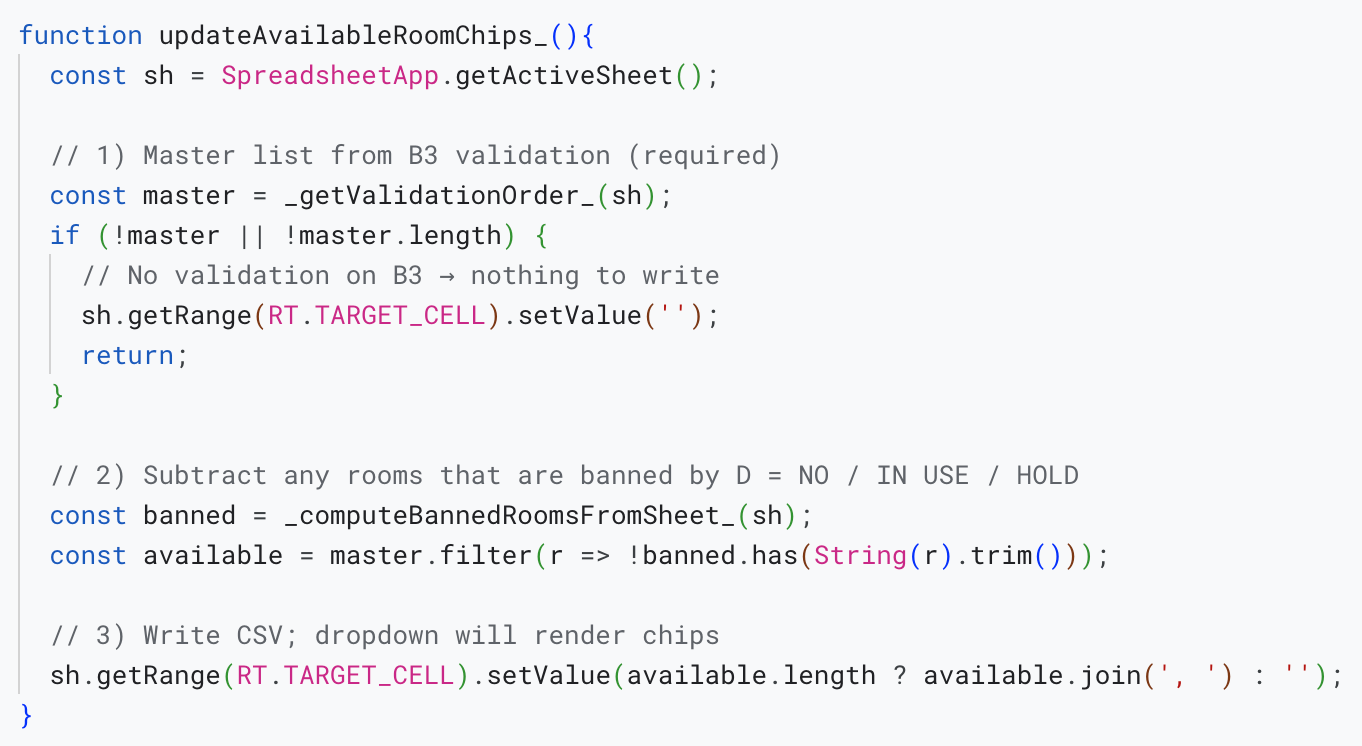
Safe-to-re-run logic: the system recomputes availability from live status and overwrites the output (no duplicates).
Key Features I Implemented:
* Reliable daily sheet creation with predictable results
* Repeat-safe automation designed for live clinic use
* Glanceable, color-coded UI designed for time-constrained staff
* Clean separation between business logic and user interface
* Automatic archiving with built-in traceability
* Guardrails that protect data without slowing users down
The Outcome
The Room Tracker stabilized morning operations by giving staff an accurate, ready-to-use view of patient flow from the moment the clinic opened. Setup became predictable, and daily records were captured in one-click.
Impact:
* Cut setup time by about 90%
* Eliminated missed or incomplete trackers, even during busy mornings
* Produced clean, consistent data across all shifts, removing the need for screenshots
The system became a small but powerful part of the clinic’s daily rhythm—quietly running in the background and keeping everyone aligned.

Before: raw export from Jane

After: operational room tracker
What I Learned
This project taught me how to manage an AI-assisted build from start to finish. I learned to translate real operational pain points into clear technical instructions, guide ChatGPT to generate usable code, and refine that code through hands-on testing in a live environment.
It showed me how AI and human judgment can work together effectively. I defined the workflow logic and usability goals; the AI accelerated implementation. The result was a tool the team now relies on every day.
One unexpected outcome was the impact on morale. When staff trusted the system and no longer worried about setup errors, mornings felt calmer. That confidence carried into patient interactions, improving the overall experience in ways that went beyond efficiency alone.
My systems philosophy: Start by making work easier to think about. Then automate what’s repeatable. Systems earn trust when they are safe to re-run, easy to understand, and resilient to human error.
Next Steps
While Jane doesn’t offer a public API, there are still meaningful ways to extend this system.
Future enhancements could include:
* Expanding the script to handle additional daily workflows
* Adding lightweight summaries to show trends like patient volume or room turnover rate
* Refining the archive for faster lookup and reporting
This project sparked my interest in continuing to design AI-assisted workflow tools that work within existing platforms—bridging the gap between robust systems and practical solutions for day-to-day operations.